English
 Español
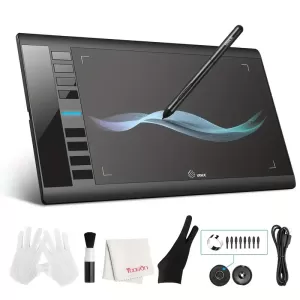

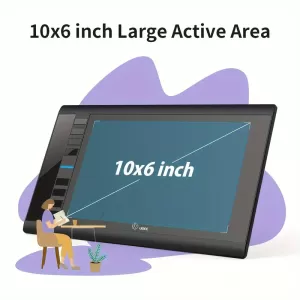


The Drawing Tablet is a 10 x 6-inch digital graphics tablet that gives illustrators, designers, and artists a large workspace to unleash their creativity. With its 8 programmable hotkeys, 8192 pressure levels, and battery-free pen, this feature-rich tablet is the perfect instrument for accurate and organic drawing strokes.
The elegant, portable design makes it ideal for both novices and experts. Its complete compatibility with Chromebooks, Windows, and macOS guarantees smooth operation on a variety of devices. You may freely express your creativity with the tablet's compatibility with industry-standard design programs including Adobe Photoshop, Illustrator, CorelDRAW, Clip Studio Paint, and more.
Technical Specifications:
- Active Drawing Area: 10 x 6 inches.
- Pressure Levels: 8192 levels of pressure sensitivity for highly accurate and smooth strokes.
- Stylus Type: Battery-free pen with two customizable shortcut buttons.
- Connection: Wired USB connection (USB cable included).
- Hotkeys: 8 customizable shortcut keys for quick access to essential functions.
- Operating System Compatibility: Windows 7/8/10, macOS 10.10 and above, and Chromebook.
- Tablet Dimensions: 36 cm x 21 cm x 0.8 cm (approximate).
- Color: Black.
Key Features:
- 8192 Levels of Pressure Sensitivity: Provides a natural pen-on-paper experience with precise control over line thickness and opacity.
- Battery-Free Stylus: No need to charge or replace batteries, allowing you to work uninterrupted.
- 8 Customizable Shortcut Keys: Save time by programming shortcuts for frequently used functions, such as zoom, undo, or tool selection.
- Wide Compatibility: Works seamlessly with Windows, macOS, and Chromebook, making it versatile for multiple devices.
- Lightweight and Portable: Its slim design allows you to take it anywhere, making it ideal for students, freelancers, and digital nomads.
Product Benefits
- Precise Drawing Experience: The 8192 levels of pressure sensitivity let you achieve highly detailed and precise strokes, whether you're sketching, shading, or inking.
- Increased Productivity: Use the 8 customizable hotkeys to quickly access essential tools, making your workflow faster and more efficient.
- Uninterrupted Drawing Sessions: With a battery-free stylus, you never have to worry about charging or battery replacements, ensuring continuous creativity.
- Wide Compatibility: Supports major design software and multiple operating systems, providing flexibility for any artist or designer.
- Portable and Space-Saving Design: Its lightweight and compact design allows you to work from your home, office, or studio without taking up much space.
- Perfect for Beginners and Professionals: The easy setup and user-friendly design make it perfect for beginners, while its advanced features satisfy professional artists and designers.
- Enhanced Control and Customization: The 8 programmable shortcut keys let you control your creative process, making it faster and more efficient.
Frequently Asked Questions (FAQ)
1. What’s included in the product package?
The package includes:
- 1 UGEE M708 Drawing Tablet (10 x 6 inches).
- 1 Battery-free Stylus with 2 customizable buttons.
- 1 USB cable for connecting the tablet to a computer.
- 1 Drawing Glove to reduce hand friction.
- 1 User Manual with setup instructions and driver information.
2. Is the UGEE M708 compatible with all operating systems?
Yes, the tablet is compatible with Windows 7/8/10, macOS 10.10 and higher, and Chromebook devices. It works on desktops, laptops, and Chromebooks.
3. Does the stylus require batteries or charging?
No, the stylus is battery-free. It uses electromagnetic resonance technology, meaning it doesn’t require batteries or charging. This allows for continuous drawing sessions without interruptions.
4. How do the customizable hotkeys work?
The tablet includes 8 hotkeys that can be customized to perform specific functions, such as "Undo," "Zoom In," or "Brush Tool." You can customize them through the UGEE software, which is available for free download.
5. What design software is compatible with this tablet?
The UGEE M708 works with popular design software, including:
- Adobe Photoshop
- Adobe Illustrator
- CorelDRAW
- Clip Studio Paint
- SketchBook Pro
- ZBrush
6. How do I install and set up the tablet?
Simply connect the tablet to your computer via the included USB cable. Download and install the UGEE driver from the official website to access all its features and customization options.
7. How much pressure sensitivity does the tablet have?
The tablet supports 8192 levels of pressure sensitivity, allowing for smooth and precise line variations, shading, and line thickness control.
8. Can I use the tablet for online teaching and virtual meetings?
Yes, the UGEE M708 can be used for online teaching, e-learning, and virtual whiteboarding. It's compatible with apps like Zoom, Microsoft Teams, and Google Meet, allowing you to write, draw, and annotate in real-time.
9. Can I use the tablet for note-taking?
Yes, the tablet is perfect for digital note-taking. You can take notes, annotate PDFs, and mark up documents during online classes or meetings.
10. Is it suitable for beginners?
Absolutely. The tablet is easy to set up, and the intuitive design allows beginners to start drawing or designing right away.
11. How do I clean the drawing tablet?
To clean the surface, use a soft, dry cloth. Do not use abrasive cleaners or liquids that may damage the surface.
12. Can I use the tablet without an internet connection?
Yes, the tablet does not require an internet connection. You only need to connect it to your computer using the USB cable.
13. How does the tablet connect to a computer?
The tablet connects via a USB cable (included). Simply plug the USB cable into your computer’s USB port, and it will be ready for use.
14. Can I replace the pen tips?
Yes, replacement pen tips are available. You can contact the manufacturer or authorized retailers to purchase extra nibs.
15. Is there a warranty for this product?
Yes, the tablet comes with a 12-month warranty that covers manufacturer defects. Check with the retailer for specific warranty details.
16. Does it have palm rejection technology?
The tablet does not have palm rejection as it is not a touchscreen device. The included glove helps prevent accidental hand touches.
17. How do I update the tablet drivers?
Visit the official UGEE website and download the latest driver version compatible with your operating system. Install it on your computer to keep the tablet running smoothly.
18. Can I draw in color with this tablet?
Yes, you can draw in color using software like Photoshop, Illustrator, or Clip Studio Paint. The tablet allows you to select any color from the software's color palette.
19. How portable is the UGEE M708?
The UGEE M708 is lightweight, ultra-thin, and portable, making it easy to carry in a backpack or laptop bag.
20. How do I reset the tablet if it stops working?
If the tablet stops responding, try the following steps:
- Unplug the USB cable.
- Reinstall the UGEE driver from the official website.
- Restart your computer and reconnect the tablet.
| Shipping Cost |
|
| Shop Location | United States |
No reviews found.